Guide
Undo what an AI agent did to your CRM
An agent that edits records will eventually edit the wrong ones: a bad merge, a field overwritten across a few hundred contacts. The recovery you want is a button, not a spreadsheet and an afternoon. Deskhand records every agent write and lets you reverse one change or a whole run.
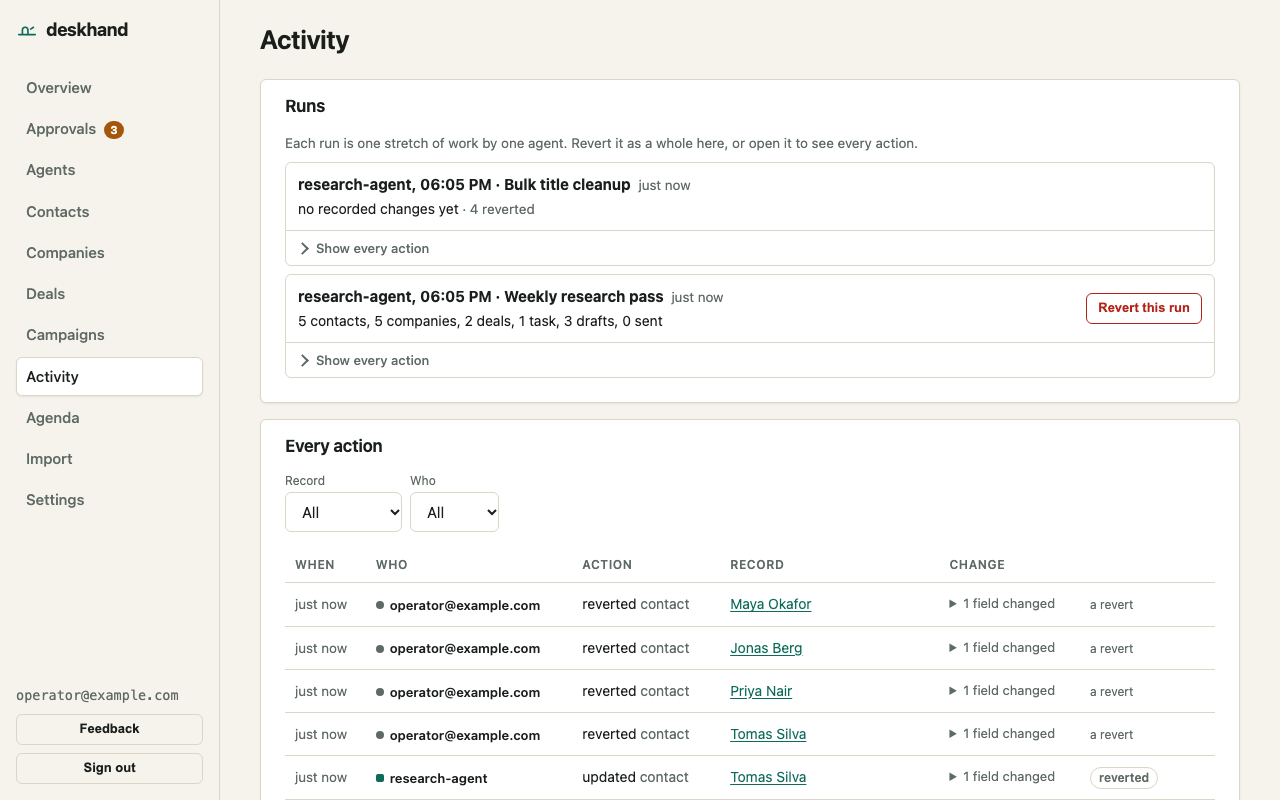
What is recorded
Each write stores the agent, the run, the request id, and the record as it was before and after. Entries are appended and never edited; a revert is itself an entry, so the history is always complete.
Name a run
Calls within 30 minutes of each other share a run automatically. To make a run something you can find later, name it:
curl -X POST https://deskhand.grain64.com/api/contacts/upsert \
  -H "Authorization: Bearer $DESKHAND_KEY" \
  -H "Content-Type: application/json" \
  -H "X-Run-Id: prospecting-2026-10-12" \
  -H "X-Run-Label: Seed-stage dev tools, batch 1" \
  -d '{"email":"grace@example.com","name":"Grace","source":"batch-1"}'
See it on your own data: connect an agent, let it write, and revert the run from the console in two clicks. Start free
Revert
Reverting is a human action: it needs your console session, not an agent key (writes made with a session cookie also need the X-Deskhand: 1 header). In the Activity view, open the run and choose Revert run, or revert a single change. The same two calls exist over HTTP. The stored id of a named run is run_ followed by the X-Run-Id you sent (the Activity view and the audit log show it):
curl -X POST https://deskhand.grain64.com/api/runs/run_prospecting-2026-10-12/revert \
  -H "Cookie: <console session>" \
  -H "X-Deskhand: 1"

curl -X POST https://deskhand.grain64.com/api/audit/<entry id>/revert \
  -H "Cookie: <console session>" \
  -H "X-Deskhand: 1"
Reverting restores each record to its before-image. If a record was changed again after the agent changed it, that entry is skipped and reported, with the reason "changed again after this entry", instead of overwriting the newer edit. The response of a run revert lists what was reverted and what was skipped.
The limit
Revert covers CRM records, imports and campaign changes. An email that has already been sent stays sent, and the revert says so. Approved mail goes out through the To send queue, and you send each message yourself.
Try it
Free during early access: 3 agents, each with its own key, a pause switch and the full audit log. Start free
Related: Let an AI agent act on its own, and turn on approval only where you want it, An MCP server for a CRM: per-agent keys, scopes and a pause switch